
+91 98963 83345
mukesh@ganpaticomputers.com
Indira Market, Near Shivalik Cinema, Railway Road, Bahadurgarh-124507 (HR)

Network Switch Setup in Bahadurgarh: Smart LAN Guide for Offices, Shops & CCTV Systems

When multiple computers, printers, billing counters, CCTV cameras, servers or internet devices need to work together, a simple Wi-Fi router may not be enough. A business network needs stable wired connectivity, clean cable planning and the right switching setup. This guide on Network Switch Setup in Bahadurgarh explains how offices, shops, schools, clinics, warehouses and small businesses can build a reliable LAN network without confusion.
Ganpati Computers provides networking-related products and services in Bahadurgarh, including routers, switches, connectivity support, network troubleshooting and hardware services. A properly planned Network Switch Setup in Bahadurgarh can reduce internet drops, improve device communication, support CCTV systems and make printer sharing easier for daily operations.

Table of Contents

What Network Switch Setup in Bahadurgarh Means

Network Switch Setup in Bahadurgarh refers to the process of connecting multiple devices through a network switch so they can communicate over a local area network. A switch receives data from one device and forwards it to the correct connected device. This makes it useful for offices, shops, CCTV camera networks, printer sharing, computers, servers and other wired devices.

For a small setup, a few LAN ports on a router may work. But when device count grows, Network Switch Setup in Bahadurgarh becomes important. It allows cleaner connectivity, better network structure and more stable performance than depending only on Wi-Fi for every device.

Why a Network Switch Is Important for Offices, Shops and CCTV

A network switch helps create a wired backbone for daily business activity. Wired networks are often preferred for billing systems, office computers, network printers, desktop PCs, servers and CCTV cameras because they are more stable than wireless connections. Shops that use billing software, card machines, barcode scanners and printers can benefit from reliable LAN connectivity.
A planned Network Switch Setup in Bahadurgarh also helps reduce messy cabling and random device disconnections. When the switch, router, cables and device placement are selected properly, the entire network becomes easier to manage and troubleshoot.

Router vs Switch: Simple Difference Before Setup

A router connects your local network to the internet and distributes the connection to connected devices. A network switch connects multiple wired devices inside the same local network. In simple words, the router is the internet gateway, while the switch expands and manages wired device connectivity inside the office or shop.
Understanding this difference is important before Network Switch Setup in Bahadurgarh. Many users try to connect too many devices directly to the router. A switch gives extra LAN ports and creates a better structure for desktops, printers, CCTV NVR, access points and other business devices.

Network Switch Setup in Bahadurgarh for Offices

Office networks usually include desktops, laptops, printers, scanners, Wi-Fi access points, shared storage, CCTV and sometimes servers. A professional Network Switch Setup in Bahadurgarh can help connect these devices through organized LAN cabling. This makes file sharing, printer access and internet use smoother during working hours.
For offices, the switch should be chosen according to device count and growth plans. A small office may need an 8-port or 16-port switch, while a larger setup may need more ports, structured cabling and better network organization.

Network Switch Setup in Bahadurgarh for Shops and Billing Counters
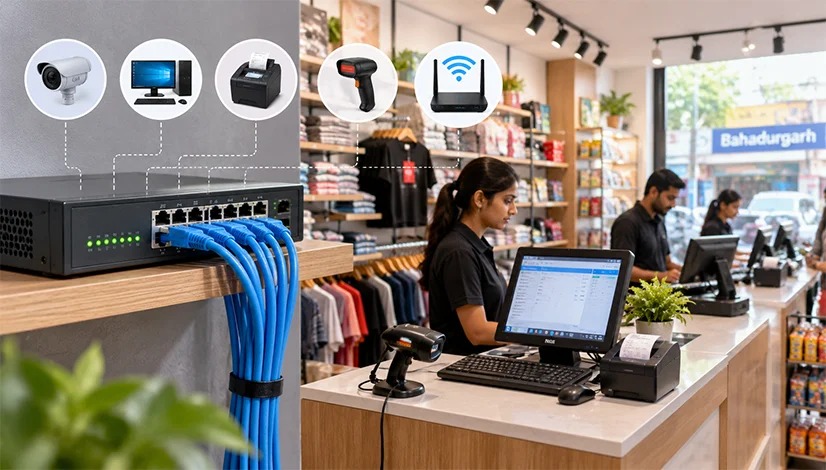
Network Switch Setup in Bahadurgarh connecting a shop’s billing PC, receipt printer and CCTV
For retail shops, medical stores, coaching centres, service counters and showrooms, Network Switch Setup in Bahadurgarh can support billing computers, receipt printers, barcode scanners, payment devices, CCTV cameras and Wi-Fi routers. A wired connection keeps important counters more stable than Wi-Fi-only setups.
A clean switch setup helps avoid downtime during billing, customer rush and daily closing work. Cables should be labelled, the switch should be placed in a safe location, and backup power should be considered where required.

Network Switch Setup in Bahadurgarh for CCTV Systems

CCTV systems often require stable network connectivity, especially when cameras, NVR, router and monitoring screens are connected together. A correct Network Switch Setup in Bahadurgarh can help organize CCTV camera connectivity and improve reliability for homes, shops, offices and warehouses.
Camera count, cable length, switch port availability and power planning should be checked before installation. For some camera systems, PoE switches may be required if supported by the camera setup. The final choice should be based on the actual CCTV system and site requirements.

Managed vs Unmanaged Switches for Local Businesses

An unmanaged switch is simple and suitable for many small offices and shops. It works with minimal configuration and is useful when the network requirement is basic. A managed switch gives more control, monitoring and advanced features. For many local users, Network Switch Setup in Bahadurgarh starts with an unmanaged switch, but larger businesses may need managed features depending on network size.

The choice should not be based only on price. Device count, future expansion, CCTV requirement, data traffic and troubleshooting needs should be considered. “For ongoing monitoring and troubleshooting, explore Ganpati Computers’ Network Management Services in Bahadurgarh.”

LAN Cable Planning and Installation Tips

Good cabling is as important as the switch itself. During Network Switch Setup in Bahadurgarh, cable route, cable length, connector quality, wall points, switch location and device placement should be planned properly. Poor cabling can create network drops even when the switch is good. “Most wired LANs use Ethernet to connect switches, computers, printers and other compatible devices.”

Use proper LAN cables, avoid loose connectors, keep cables away from damage-prone areas, label important wires and maintain a simple network diagram. These small steps make future troubleshooting much easier.

Common Network Switch Mistakes to Avoid

Common mistakes during Network Switch Setup in Bahadurgarh include buying too few ports, using low-quality cables, placing the switch in a dusty or unsafe area, ignoring power backup, mixing random wires without labels and depending only on Wi-Fi for critical devices. These mistakes can lead to slow speed, device disconnection and difficult troubleshooting.“If network hardware needs diagnosis or repair, explore Ganpati Computers’ Hardware Services in Bahadurgarh.” 

Another mistake is not planning for future devices. If your business may add more computers, cameras, printers or access points later, choose a switch and wiring plan that can support expansion.

FAQs on Network Switch Setup in Bahadurgarh

Q1. Who needs Network Switch Setup in Bahadurgarh?
Offices, shops, CCTV users, schools, clinics and businesses with multiple wired devices can benefit from it.
A router may be enough for very small setups, but a switch is better when several wired devices need stable connectivity.
Yes, a network switch can help organize CCTV network connectivity when cameras, NVR and monitoring systems are connected through LAN.
Choose ports according to current devices and future expansion. Common options include 5-port, 8-port, 16-port and higher-port switches.

Final Recommendation

A reliable Network Switch Setup in Bahadurgarh can make business connectivity smoother, especially where computers, printers, CCTV cameras and billing systems need stable wired communication. Instead of choosing random networking hardware, plan the number of devices, cable routes, switch capacity and future needs. Contact Ganpati Computers to choose a practical network setup for your office, shop or CCTV system in Bahadurgarh. 

Scroll to Top